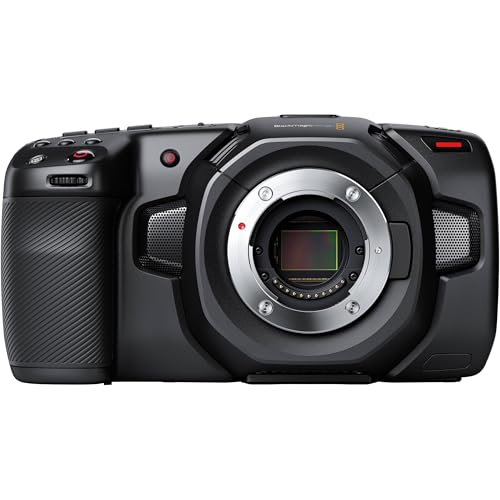
¿Son buenas las cámaras Blackmagic?
Las cámaras Blackmagic son muy buenas para cine narrativo, comercial, documental, estudio, producción en directo y cine independiente cuando los datos de imagen y el control de posproducción importan más que la automatización de las cámaras de consumo.
El mayor valor está en el flujo de grabación. Según el modelo, Blackmagic ofrece BRAW o ProRes interno, captura open gate, ISO nativo dual, código de tiempo, herramientas profesionales de exposición, audio de clase XLR y soportes SD, CFast, CFexpress o USB-C. Los metadatos BRAW se integran estrechamente con DaVinci Resolve para color, proxys, audio y entrega. La concesión es la automatización: la mayoría de los cuerpos carece de enfoque automático continuo fiable e IBIS, mientras que el ND interno depende del modelo. Los sistemas Pocket, PYXIS y URSA también pueden necesitar alimentación, soporte, almacenamiento, monitorización y audio externos, así que presupuesta el rig completo, no solo el cuerpo.
¿Cuáles son las principales ventajas de las cámaras Blackmagic?
Las principales ventajas de las cámaras Blackmagic son las siguientes:
- Flujo de trabajo Blackmagic RAW: BRAW graba datos de imagen con alta profundidad de bits y permite elegir compresión de tasa constante o de calidad constante, a la vez que conserva los metadatos de la cámara para la posproducción. Está estrechamente integrado con DaVinci Resolve, lo que aporta una coherencia poco habitual a la creación de proxys, la gestión del color, la gradación y el acabado, desde la captura hasta la entrega.
- Herramientas de monitorización profesionales: Las grandes pantallas táctiles y la interfaz Blackmagic OS ofrecen forma de onda, falso color, cebras, focus peaking, guías de encuadre, monitorización LUT, medidores de audio y un estado de grabación detallado sin depender de una interfaz de consumo repleta de menús. Estas herramientas ayudan a exponer de forma uniforme el material log o RAW en el set.
- Buena calidad de imagen por el precio: Los modelos Pocket, Cinema y PYXIS 6K suelen ofrecer unos 13 pasos de rango dinámico declarado, mientras que los sensores URSA Cine de gama alta superan esa cifra según el modelo. Los diseños de ISO nativo dual y la captura de alta resolución proporcionan a los cineastas un margen considerable para la gradación cuando la exposición y la iluminación están controladas.
- Soportes de grabación flexibles: Los distintos modelos pueden grabar en SD UHS-II, CFast 2.0, CFexpress, SSD USB-C externos o módulos de almacenamiento URSA de gran capacidad. Esto permite que una producción equilibre coste, tasa de datos sostenida, capacidad y velocidad de descarga en vez de quedar limitada a un solo formato de tarjeta propietario en toda la gama.
- Valor del ecosistema DaVinci Resolve: Muchas cámaras Blackmagic incluyen una licencia de DaVinci Resolve Studio, que añade edición, efectos visuales Fusion, audio Fairlight, gradación de color, reducción de ruido y herramientas de entrega. Blackmagic también fabrica mezcladores, monitores, convertidores, tarjetas de captura y superficies de control que se integran de forma natural en el mismo entorno de producción.
¿Cuáles son las principales desventajas de las cámaras Blackmagic?
Las principales desventajas de las cámaras Blackmagic son las siguientes:
- Automatización del enfoque limitada: La mayoría de las cámaras Blackmagic ofrece enfoque automático sencillo, enfoque al pulsar o un control básico del objetivo en lugar del seguimiento continuo moderno de rostros, ojos, animales o vehículos. Los operadores de documentales que trabajan solos suelen necesitar enfoque manual, un foquista dedicado o un sistema de enfoque externo.
- Poca o ninguna estabilización integrada: Los cuerpos Pocket, Cinema, PYXIS y la mayoría de los URSA dependen de objetivos estabilizados, un rig de hombro, un trípode, un gimbal u otro soporte. Los metadatos del giroscopio pueden ayudar a estabilizar en posproducción con cámaras compatibles, pero el recorte y el tiempo de renderizado hacen que sea distinto de la estabilización óptica o por desplazamiento del sensor durante la captura.
- El rig y la alimentación aumentan el coste: Un precio bajo del cuerpo puede requerir jaula, barras, asa superior, placa para batería externa, soporte para SSD, matte box, monitor, visor electrónico, hardware de audio y sistema de soporte antes de que la cámara esté lista para producir. Las baterías Pocket, en particular, son más adecuadas para tomas cortas que para una jornada de rodaje ininterrumpida.
- Los filtros ND internos varían según el modelo: Pocket Cinema Camera 6K Pro y muchas configuraciones URSA o Studio incorporan filtros ND, mientras que Pocket 4K, Pocket 6K G2, Cinema Camera 6K y ciertas configuraciones PYXIS pueden necesitar filtros para el objetivo o una matte box. Esto cambia la rapidez en grabaciones dinámicas y debe comprobarse antes de elegir entre cuerpos que, por lo demás, comparten sensor.
- Las tasas de datos altas y el rolling shutter exigen planificación: BRAW, ProRes, las altas velocidades de fotogramas y la captura open gate pueden generar archivos grandes y exigir soportes certificados, copias de seguridad rápidas y una estación de edición potente. La lectura del sensor también varía según la resolución y el modo de recorte, por lo que un movimiento rápido de la cámara puede mostrar deformación si no se prueba el modo elegido.
¿Quién fabrica las cámaras Blackmagic?
Las cámaras Blackmagic las fabrica Blackmagic Design Pty Ltd, una empresa privada australiana fundada en 2001 por el cineasta e ingeniero Grant Petty, que sigue siendo su director ejecutivo. La empresa tiene su sede en Melbourne y se dio a conocer inicialmente por las tarjetas de captura de vídeo DeckLink, que redujeron el coste de los flujos de vídeo profesional sin comprimir.
Blackmagic se expandió mediante los mezcladores ATEM, los grabadores HyperDeck, los convertidores, los monitores y el software. Su adquisición de Da Vinci Systems en 2009 dio lugar a la plataforma que se convirtió en DaVinci Resolve; operaciones posteriores añadieron el escaneado Cintel y el audio Fairlight. La Blackmagic Cinema Camera 2.5K, anunciada en 2012, estableció la estrategia de cámaras de la compañía: priorizar los códecs, el rango dinámico, la monitorización y la integración con la posproducción frente al enfoque automático de consumo y las funciones fotográficas. Las familias Pocket Cinema, URSA, Studio, Micro, Cinema Camera y PYXIS atienden ahora desde pequeños equipos hasta producciones de alto nivel dentro del ecosistema Blackmagic OS y Resolve.
¿Cuáles son los principales modelos de cámaras Blackmagic?
Los principales modelos y familias de cámaras Blackmagic son los siguientes:
- Pocket Cinema Camera 4K: Esta cámara de cine compacta Micro Cuatro Tercios graba Blackmagic RAW y ProRes en CFast 2.0, SD UHS-II o una unidad USB-C externa. Su montura es muy adaptable y el sensor Cuatro Tercios permite usar ópticas compactas, pero no dispone de ND interno, enfoque automático continuo con seguimiento del sujeto ni IBIS.
- Pocket Cinema Camera 6K G2 y 6K Pro: Estos cuerpos Super 35 con montura EF ofrecen BRAW 6K, un sensor más grande que el de la Pocket 4K, audio mini-XLR y alimentación mediante batería NP-F570. La 6K Pro añade una pantalla inclinable más luminosa, filtros ND motorizados integrados y compatibilidad con un visor electrónico opcional, lo que la convierte en el conjunto portátil más completo.
- Cinema Camera 6K y PYXIS 6K: Cinema Camera 6K combina un sensor de formato completo 6K, montura L, grabación open gate y una gran pantalla táctil trasera en un cuerpo de estilo Pocket. PYXIS incorpora una imagen similar en un cuerpo tipo caja con placas laterales, opciones de rig y conexión más sólidas y variantes de montura adecuadas para flujos con objetivos L, PL o EF.
- Familias PYXIS 12K y URSA Cine: PYXIS 12K lleva un sensor RGBW de formato completo y mayor resolución al formato modular tipo caja, mientras que los modelos URSA Cine añaden alimentación, soportes, conexiones, refrigeración y opciones de producción de gran capacidad más profesionales. Estas cámaras se dirigen a anuncios, largometrajes, producción virtual y equipos que trabajan con matte boxes, vídeo inalámbrico, follow focus, código de tiempo y alimentación de cine.
- URSA Mini Pro y URSA Broadcast: Las cámaras URSA Mini Pro combinan ergonomía de cámara al hombro, filtros ND internos, monturas de cine intercambiables o adaptables y opciones de grabación de gama alta, incluidos modelos Super 35 12K. Las variantes URSA Broadcast dan prioridad a objetivos B4, controles ENG, transmisión e integración con producciones en directo frente a la grabación narrativa compacta.
- Familias Studio y Micro Studio Camera: Las Studio Cameras ofrecen grandes pantallas, tally, intercomunicación, retorno de programa, conexiones Ethernet o SDI y control remoto para producciones multicámara basadas en ATEM. Los cuerpos Micro Studio reducen el tamaño para posiciones fijas, grúas, vehículos o rigs compactos para directo, pero normalmente necesitan monitorización y soporte externos.
¿Cuánto cuestan las cámaras Blackmagic?
Las cámaras Blackmagic nuevas suelen costar unos 1,200–16,000 € por el cuerpo o el paquete de producción, con los modelos Pocket en el extremo inferior y los sistemas URSA Cine totalmente equipados en el superior.
Pocket Cinema Camera 4K suele costar unos 1,200–1,400 €. Pocket Cinema Camera 6K G2 se sitúa normalmente en unos 1,900–2,200 €, mientras que la 6K Pro cuesta aproximadamente 2,400–2,700 € porque añade filtros ND internos, una pantalla inclinable más luminosa y compatibilidad con un visor opcional.
Cinema Camera 6K suele costar 1,600–2,000 €, mientras que PYXIS 6K se sitúa en unos 3,200–3,600 € antes del rig y PYXIS 12K en unos 5,000–6,000 €. Los modelos Studio y Broadcast suelen abarcar 1,200–4,500 €, según el sensor y las conexiones. Los sistemas URSA Mini Pro y URSA Cine van desde unos 7,000 € por un cuerpo hasta 15,000–16,000 € o más por un kit de producción. Los objetivos, el soporte, la alimentación, los soportes de grabación certificados, la monitorización, el audio, el código de tiempo y el almacenamiento de respaldo pueden sumar otros 1,000–8,000 €.
¿Cómo se comparan las cámaras Blackmagic con los modelos RED?
Blackmagic suele ofrecer una mejor relación calidad-precio para la captura BRAW, la integración con DaVinci Resolve y las herramientas de monitorización integradas, mientras que RED destaca más en flujos R3D, sistemas modulares de gama alta, opciones con obturador global y circuitos de alquiler profesional consolidados. Ninguna de las dos marcas está diseñada en torno al enfoque automático de consumo ni la estabilización integrada.
Blackmagic abarca cuerpos Pocket, PYXIS, Studio, Broadcast y URSA con falso color, monitorización de forma de onda, grabación externa y una licencia de Resolve Studio en muchos modelos. Las familias KOMODO y V-RAPTOR de RED priorizan flujos modulares RF/PL, expansión profesional y entornos de producción ya estandarizados en soportes y accesorios RED.
Las cámaras Blackmagic cuestan aproximadamente 1,200–16,000 €, mientras que los cuerpos RED actuales suelen empezar en unos 6,000 € y pueden superar 20,000 € antes de completar un kit de producción. Blackmagic resulta más fácil de justificar para equipos pequeños y la propiedad de varias cámaras; elige RED cuando R3D, un cuerpo concreto con obturador global o la compatibilidad con empresas de alquiler compensen el precio equipado, considerablemente más alto.
¿Qué debes considerar al elegir la mejor cámara Blackmagic?
Ten en cuenta los siguientes puntos al elegir una cámara Blackmagic:
- Función en la producción y forma del cuerpo: Los cuerpos Pocket y Cinema Camera incorporan una pantalla trasera, PYXIS es una caja modular, URSA está diseñada para rigs profesionales más grandes y los modelos Studio o Broadcast se orientan a la producción en directo. Antes de comparar la resolución, decide si la cámara se usará en mano, al hombro, sobre un gimbal, fija en un estudio o integrada en un sistema multicámara.
- Formato del sensor y recorte: Pocket 4K utiliza un sensor Cuatro Tercios, Pocket 6K un Super 35 y Cinema Camera 6K/PYXIS 6K el formato completo, mientras que las familias URSA incluyen varios tamaños de sensor. Calcula el campo de visión, el rolling shutter, la cobertura del círculo de imagen necesaria para el objetivo y el comportamiento de la profundidad de campo para el sensor y la ventana de grabación concretos.
- Montura y control electrónico del objetivo: Las configuraciones Micro Cuatro Tercios, EF, L, PL y B4 admiten objetivos y adaptadores muy diferentes. Confirma la cobertura del círculo de imagen, la compatibilidad de la distancia de registro, el control de apertura, la estabilización del objetivo, los comandos de enfoque automático, los metadatos y si la montura del cuerpo elegido es fija o intercambiable.
- BRAW, ProRes y resolución: Comprueba qué códecs están disponibles con la resolución, velocidad de fotogramas, área del sensor y ajuste de compresión necesarios; ProRes no se ofrece de forma idéntica en todos los modelos nuevos. Calcula los minutos reales por tarjeta para los modos BRAW de tasa constante o calidad constante, en lugar de elegir el soporte por la mera indicación 4K, 6K o 12K.
- Rango dinámico y exposición: El rango dinámico declarado varía desde unos 13 pasos en muchos modelos Pocket/Cinema/PYXIS 6K hasta cifras mayores en determinados sensores URSA Cine. Prueba la transición de las altas luces, el ruido, el comportamiento del ISO nativo dual y el flujo de Resolve con gestión del color previsto, porque una cifra de pasos publicada no sustituye una iluminación y exposición correctas.
- Enfoque automático y estabilización: Da por hecho que necesitarás enfoque manual y soporte externo, salvo que el modelo y el objetivo concretos demuestren lo contrario. El enfoque al pulsar, los metadatos del giroscopio, la estabilización óptica del objetivo, los gimbals y la estabilización en posproducción resuelven problemas distintos y no equivalen al seguimiento continuo del sujeto combinado con IBIS.
- Configuración de filtros ND: Pocket 6K Pro y muchas configuraciones URSA o Studio incluyen ND interno, mientras que Pocket 4K, Pocket 6K G2, Cinema Camera 6K y PYXIS pueden necesitar filtros de rosca o una matte box. Confirma la densidad del filtro, el control de infrarrojos, los cambios de objetivo y la rapidez en grabaciones dinámicas para las condiciones de iluminación previstas.
- Soportes y tasa de datos: Ajusta SD UHS-II, CFast 2.0, CFexpress, SSD USB-C o los soportes URSA a los requisitos certificados de escritura sostenida de la cámara. Calcula el volumen diario de material, las copias en el set, la verificación mediante sumas de comprobación, la capacidad de respaldo y el ancho de banda de posproducción antes de elegir un códec de alta tasa de datos.
- Alimentación, rig y monitorización: Calcula como un solo paquete el coste de las baterías, la alimentación externa, la jaula o placas laterales, barras, asas, monitor o EVF, vídeo inalámbrico, código de tiempo, follow focus y gestión de cables. Comprueba la posición de los conectores y la visibilidad de la pantalla, porque un cuerpo pequeño puede resultar incómodo cuando se añade cada accesorio sin planificar el rig.
- Audio, sincronización y flujo de posproducción: Verifica las entradas de micrófono, la alimentación fantasma, los adaptadores XLR o mini-XLR, la monitorización con auriculares, el código de tiempo, genlock, la salida SDI/HDMI y el control ATEM según la producción. Antes de grabar, confirma que el sistema de edición, la versión de Resolve, la GPU, el almacenamiento y los colaboradores pueden manejar los archivos BRAW o ProRes elegidos.